Interface
This section describes what the desktop app contains and how to move around it. It's a reference, not a tutorial; for a first run, see the quick start.
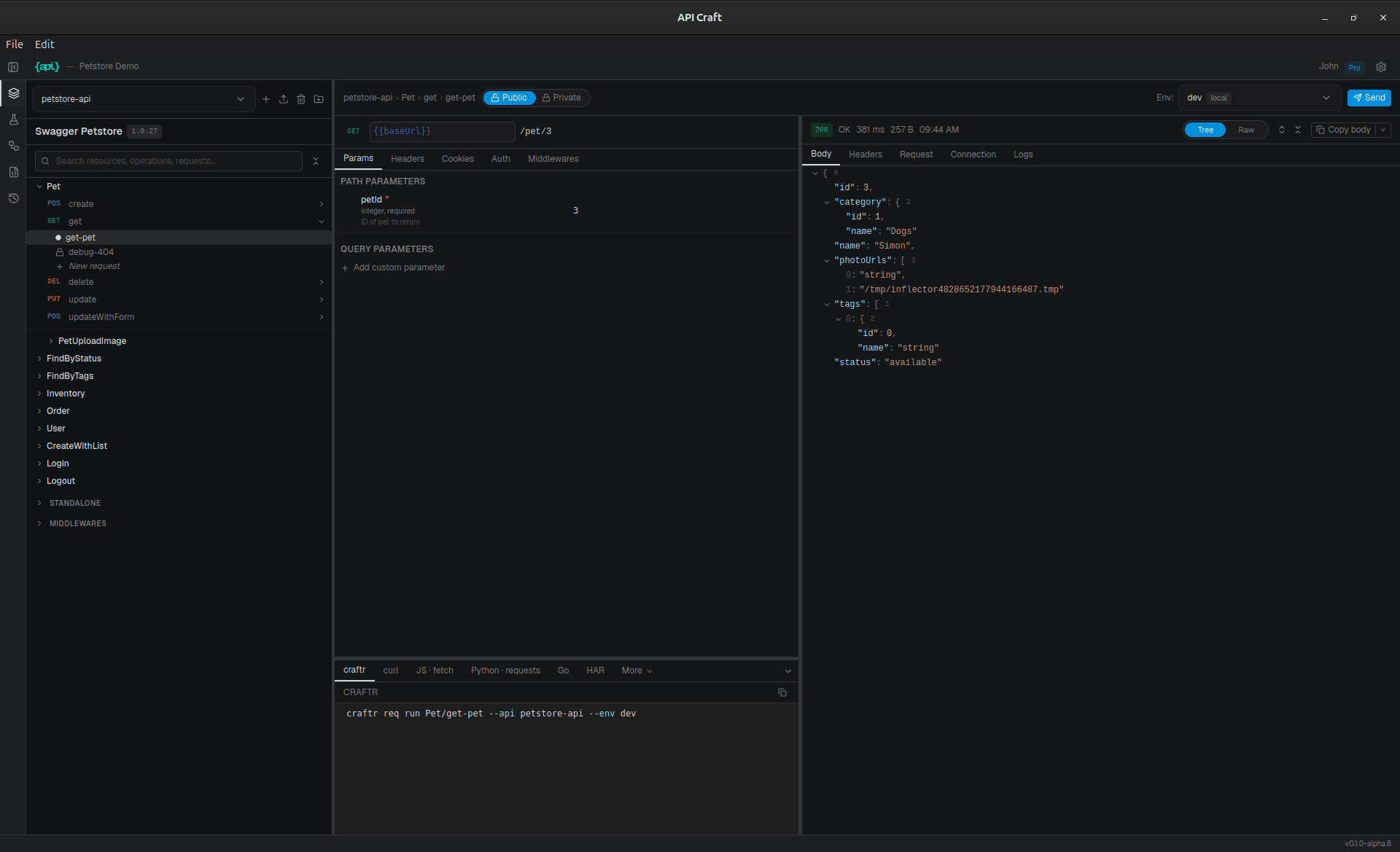
The zones
- Header bar. The sidebar toggle, app and project name, and, on the right, your plan badge (click it to upgrade) and settings.
- Icon band (far left). Switches the sidebar between five panels.
- Sidebar. Collapsible and resizable. Shows whichever panel is active:
- Schema (
Alt+1): the tree of APIs → resources → operations → request instances, plus each API's middlewares. - Environment (
Alt+2): the variable schema and one entry per environment, nested along theextendschain. - Workflows (
Alt+3): workflows and their scripts; its home screen is the run screen. - OpenAPI (
Alt+4): the spec as a document, effective or as imported, filterable. - History (
Alt+5): past request executions and workflow runs, on separate tabs.
- Schema (
- Main content. Shows the selected thing: an API, resource, or operation overview; a request; an environment editor; a workflow or its run screen; the spec; or a history entry.
- Status bar. App version and status.
Each panel is described in Navigation.
Overlays sit above everything: the command palette, dialogs, and toasts.
The request view
Selecting a request instance opens the request view, a horizontal split pane:
- Request editor (left): tabs for Params, Headers, Body, and Auth, plus a snippets panel that exports the request as HAR or code.
- Response panel (right): status and timing, with tabs for the response Body, Headers, and the Request as sent.
The top bar of the request view carries the breadcrumb, the visibility toggle, the environment selector, and the Send button (Ctrl+Enter). On a temp request it also carries Reset to template; see defaults are a starting point.
The API view
Selecting an API opens a tabbed view:
- Config: the base URL and the API's default auth. Both take
{{variables}}, and the first import fills them from the spec; see Importing a spec. Resources have the same tab, and operations get one too, each overriding the level above. - Overrides: everything you've changed on top of the imported spec, grouped by kind.
- Documentation: the API's own docs pages.
- Preferences: per-API settings.
See Navigation for how to move between things, and Keyboard shortcuts for the full list.