Writing workflows
A workflow is an ordered list of blocks. Each block does one thing (fire a request, check a value, branch, loop) and later blocks read the results of earlier ones. The run passes only if every block passes.
Workflows are project-scoped: one workflow can call operations across several APIs (create through your admin API, then verify through another). The environment isn't baked into the definition; it's bound per API at run time. See Multiple APIs & environments.
You build workflows in the app (drag blocks, fill the forms); the definition is saved as a plain JSON file, so it's committed and reviewable like everything else.
Prefer native blocks over scripts. request, assert, transform, condition and loop
cover most tests declaratively: no code to review, no runtime to trust. Reach for a script
block only when a block can't express what you need. See Scripts.
Where it lives
Workflows sit in a reserved workflow directory under apis/, not tied to any one API:
apis/
  workflow/                          # reserved: project-scoped workflows
    pet-lifecycle.json               # the workflow definition
    scripts/
      pet-lifecycle/                 # scripts for that workflow (one folder per workflow)
        assert-missing.ts
  petstore-api/                          # your APIs
  catalog/
workflow is a reserved API slug: you can't create an API named workflow.
Anatomy
{
  "version": 1,
  "onFailure": "halt",
  "validateContracts": false,
  "inputs": {
    "petName": { "type": "string", "required": true, "default": "Rufus" }
  },
  "blocks": [ ... ]
}
| Field | Meaning |
|---|---|
version | File format version. Always 1. |
onFailure | halt (default) stops at the first failed block; continue runs the rest anyway. |
validateContracts | When true, each request block's response is checked against the operation's schema. See Contract validation. |
inputs | Named parameters asked for at run time. See below. |
blocks | The ordered list of blocks. |
Inputs
Declare the values a run needs. Each is string, number, or boolean, optionally required
with a default. At run time the app prompts for them (the Inputs panel).
"inputs": {
  "petName": { "type": "string", "required": true, "default": "Rufus" },
  "userId":  { "type": "number", "required": false, "default": 1 }
}
Reference an input anywhere a value is interpolated with {{name}}; see
Referencing data.
Blocks
Every block has a unique id and a type. The id is how later blocks address its result.
| Type | Does |
|---|---|
request | Runs an operation or a saved request instance. |
assert | Checks one or more values. Fails the block if any check fails. |
transform | Plucks values out of earlier results and names them for reuse. |
condition | Runs a then or else branch based on a check. |
loop | Repeats nested blocks: times N, forEach item, or until a check passes. |
group | Bundles nested blocks under one label. No behaviour of its own. |
script | Runs a free-form TypeScript function. Use sparingly. |
Any block also accepts an optional description, free text explaining what the block is
for. It's the file format's only comment channel (JSON has no comments), and the app shows it
next to the block:
{
  "id": "create-pet",
  "type": "request",
  "description": "Create the pet the rest of the run operates on.",
  "request": { "api": "petstore-api", "resource": "Pet", "operation": "create" }
}
request
Every request names the api it targets, then either a schema operation
(resource + operation) or a saved request instance
(resource + instance). overrides patch params and body for this run, and interpolate
{{...}}.
{
  "id": "create-pet",
  "type": "request",
  "request": {
    "api": "petstore-api",
    "resource": "Pet",
    "operation": "create",
    "overrides": {
      "body": { "name": "{{petName}}", "status": "available" }
    }
  }
}
The response lands at create-pet.response: .status, .body, .headers. api is the API's
slug; the set of api values across all request blocks is the set of APIs the workflow touches.
assert
List assertions; the block fails if any one fails. Each is a source path, an operator, and
(for most operators) a value. value may itself be a {{token}}.
{
  "id": "created",
  "type": "assert",
  "assertions": [
    { "source": "create-pet.response.status", "operator": "equals", "value": 201 },
    { "source": "create-pet.response.body.id", "operator": "exists" },
    { "source": "create-pet.response.body.name", "operator": "equals", "value": "{{petName}}" }
  ]
}
Operators:
| Operator | Passes when |
|---|---|
equals / notEquals | Deep-equal (arrays/objects too). |
exists / notExists | The source path resolves / doesn't. A key present but null still exists. |
hasValue / hasNoValue | The path resolves and the value isn't null/undefined / it doesn't. |
greaterThan / lessThan | Both sides are numbers and the comparison holds. |
contains | source is a string containing value, or an array with value as a member. |
exists asks is the field there?, hasValue asks is it there and filled in? For a nullable
field an API returns as null, exists passes and hasValue fails. Pick the one that matches
what you mean.
For a check the operators can't express, use an assert script instead of assertions; see
Scripts.
transform
Give earlier data a short name for later blocks. Each entry is outputName: sourcePath.
{
  "id": "extract",
  "type": "transform",
  "transforms": { "petId": "create-pet.response.body.id" }
}
Now {{extract.petId}} resolves to that id anywhere downstream.
condition
An if check picks the branch: then runs when it passes, else (optional) when it doesn't.
Blocks in the branch not taken are marked skipped.
{
  "id": "check-persisted",
  "type": "condition",
  "if": { "source": "get-pet.response.status", "operator": "equals", "value": 200 },
  "then": [
    { "id": "assert-name", "type": "assert",
      "assertions": [{ "source": "get-pet.response.body.name", "operator": "equals", "value": "{{petName}}" }] }
  ],
  "else": [
    { "id": "assert-gone", "type": "assert",
      "assertions": [{ "source": "get-pet.response.status", "operator": "equals", "value": 404 }] }
  ]
}
loop
Three modes:
times: repeatcounttimes. The iterator (iteratorVar) is the index,0tocount-1.forEach: walk an array atsource. The iterator is each element.until: repeat until a check passes (polling). Runs the body, then testsuntil(an assertion) or ascript; stops when it holds.delayMswaits between iterations, andmaxIterationscaps them. If the check never passes withinmaxIterations, the loop fails. The iterator is the 0-based attempt index.
execution is sequential (default) or parallel (times/forEach only). Inside the loop,
{{iteratorVar}} also expands in nested block ids so each iteration's blocks stay uniquely
named.
{
  "id": "check-each-pet",
  "type": "loop",
  "mode": "forEach",
  "source": "list-pets.response.body",
  "iteratorVar": "pet",
  "execution": "parallel",
  "blocks": [
    { "id": "pet-available", "type": "assert",
      "assertions": [{ "source": "pet.status", "operator": "equals", "value": "available" }] }
  ]
}
Polling with until: re-fetch until the pet is processed, up to 10 tries, 1s apart:
{
  "id": "wait-processed",
  "type": "loop",
  "mode": "until",
  "maxIterations": 10,
  "delayMs": 1000,
  "until": { "source": "poll.response.body.status", "operator": "equals", "value": "processed" },
  "blocks": [
    { "id": "poll", "type": "request",
      "request": { "api": "petstore-api", "resource": "Pet", "operation": "get",
        "overrides": { "params": { "path": { "pet-id": "{{extract.petId}}" } } } } }
  ]
}
group
Bundles nested blocks under one label so a long workflow stays readable. Collapse it in the app,
give it a description, and the blocks inside run exactly as they would at the top level. It adds
no behaviour of its own: no branching, no repetition, no scope of its own.
{
  "id": "setup",
  "type": "group",
  "description": "Create the fixtures the assertions below rely on.",
  "blocks": [
    { "id": "create-pet", "type": "request",
      "request": { "api": "petstore-api", "resource": "Pet", "operation": "create" } },
    { "id": "created", "type": "assert",
      "assertions": [{ "source": "create-pet.response.status", "operator": "equals", "value": 201 }] }
  ]
}
Block ids stay global: create-pet.response is reachable from outside the group, exactly as if
the group weren't there.
script
A free-form TypeScript block for the rare step no other block covers, most commonly a pause between requests:
{ "id": "wait", "type": "script", "script": { "name": "wait-2s", "exportName": "run" } }
// apis/workflow/scripts/pet-lifecycle/wait-2s.ts
import type { ScriptContext } from '@apicrafthq/script-sdk';

export const run = async (ctx: ScriptContext) => {
  await ctx.sleep(2000);
};
script blocks exist for flexibility. If a native block can do the job, use it instead.
Moving blocks between workflows
A block, with everything nested in it, can move to another workflow: drag it by its handle onto a workflow in the sidebar, or use the Move action in the block inspector and pick the target. The view follows the block to its new workflow, and the move is one undo step.
craftr workflow move-block pet-lifecycle check-status smoke             # append to smoke
craftr workflow move-block pet-lifecycle check-status smoke --index 0   # or insert first
What comes along:
- Ids: a block id already taken in the target gets a suffix (
create-pet_2), and references inside the moved block follow the rename. - Scripts: scripts the block uses are copied into the target's scripts directory (renamed on a clash); the source copy is deleted once no remaining block uses it.
- References across workflows: if the moved block reads a block left behind (or a remaining block reads it), the move still happens and the broken references are reported, in a toast and in the CLI's JSON. Fix them, or move the other block too.
Referencing data
Two ways to reach an earlier value, both using the same dot-path:
sourcefields (inassert,condition.if,transform,loop.source) take a raw path:create-pet.response.body.id,list-pets.response.body.0.name.{{token}}interpolation works inside any string value: overrides, assertionvalues, nested block ids.
A path's first segment is either a block id (its result) or an in-scope name: a workflow
input, a loop iteratorVar, or a transform output. The rest walks objects by key and arrays
by numeric index.
create-pet.response.body.id     # a block result
{{petName}}                     # an input
pet.status                      # a loop iterator element
{{extract.petId}}               # a transform output
Inputs, block results, and transform outputs are global to the run: they cross API
boundaries freely, so a value from an admin-API request feeds a later catalog-API request.
Only the environment layer (baseUrl, secrets, env values) resolves per the block's own API;
see below.
Scripts
When a block needs real logic, it runs a TypeScript function you write. assert, condition,
transform, and script blocks can all point at one via "script": { "name": ..., "exportName": ... }.
Files live in apis/workflow/scripts/<workflow-name>/.
The function receives a context typed per block kind, all from
@apicrafthq/script-sdk:
| Member | Purpose |
|---|---|
ctx.blockResult(id) | Read an earlier block's result: .response for request blocks, named keys for transforms. |
ctx.var(name) | Read an environment variable, typed from your schema. |
ctx.http | HTTP client for auxiliary calls. |
ctx.logger | debug/info/warn/error. console is not allowed. |
ctx.sleep(ms) | script blocks only. Non-blocking pause. |
Each block kind expects a specific shape:
assert(AssertContext): throw to fail, return normally to pass.condition(ConditionContext): return a boolean to pickthen/else.transform(TransformContext): return an object; its keys become the block's outputs.script(ScriptContext): side effects only; return value is ignored.
Assertions in scripts
API Craft ships no assertion library: an assert script fails by throwing, and you choose how:
// apis/workflow/scripts/pet-lifecycle/assert-missing.ts
import type { AssertContext } from '@apicrafthq/script-sdk';

// 1. A plain throw
export const run = (ctx: AssertContext) => {
  if (ctx.blockResult('get-missing-pet').response?.status !== 404) {
    throw new Error('expected 404');
  }
};
// 2. Node's built-in assert
import { strict as assert } from 'node:assert';
import type { AssertContext } from '@apicrafthq/script-sdk';

export const run = (ctx: AssertContext) => {
  assert.equal(ctx.blockResult('get-missing-pet').response?.status, 404);
};
// 3. Your own library: add it as a dev dependency (e.g. chai)
import { expect } from 'chai';
import type { AssertContext } from '@apicrafthq/script-sdk';

export const run = (ctx: AssertContext) => {
  expect(ctx.blockResult('get-missing-pet').response?.status).to.equal(404);
};
Install a library the same way as the SDK, as a dev-only dependency your editor can resolve. See Installing the types.
Each script has a 30-second timeout (override per block with timeoutMs). A thrown error fails
the block. Scripts only run in a trusted project, the same approval gate as
middlewares.
When you create a script, API Craft generates a per-workflow tsconfig.json and a blocks.d.ts
so ctx.blockResult('...') autocompletes your real block ids. Both are gitignored editor tooling.
Multiple APIs & environments
Because a workflow can span APIs, there's no single "the environment" for a run. Instead the run supplies an env binding per API: every API the workflow touches gets its own environment:
petstore-api → prod
catalog  → staging
This is deliberate: env names needn't match across APIs (petstore-api may have prod while
catalog has production), so a single global env would be a fragile guess. Each block resolves
its {{variables}} against the env bound to that block's API.
Before a run starts, API Craft validates the binding: an API with no env fails fast rather than mid-run.
WORKFLOW_MISSING_ENV_BINDING: no env provided for api "catalog"
Running
In the app
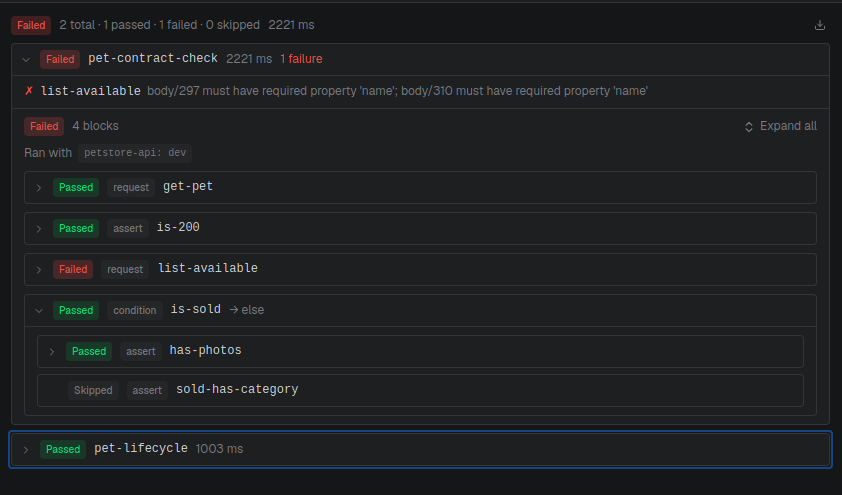
The run panel shows one environment selector per API the workflow touches, all required before Run enables. Fill any Inputs, then run. Each block reports passed, failed, or skipped; open a block to see its response and assertion details. The chosen binding is remembered for your session.
From the CLI
craftr workflow run runs one or more workflows and aggregates the results, the same engine
as the app, made for CI. Bind an environment per API with --env <api>=<env> (-e), once per
API the run touches:
# One workflow
craftr workflow run pet-lifecycle --env petstore-api=prod

# A multi-API workflow: one --env per API it touches
craftr workflow run publish-and-verify -e petstore-api=prod -e catalog=staging
Pass several names to run a batch, or --all for every workflow in the project. The --env
binding must cover the union of APIs across the whole batch:
craftr workflow run pet-lifecycle order-flow -e petstore-api=prod -e catalog=staging
craftr workflow run --all -e petstore-api=prod -e catalog=staging
By default the batch runs 4 at a time; set --concurrency 1 to run sequentially. --input
feeds workflow inputs. Prefix with <workflow>: to target one, or leave it off to apply to
every workflow in the batch:
craftr workflow run pet-lifecycle order-flow \
  -e petstore-api=prod \
  --input petName=Rufus \          # applies to both workflows
  --input order-flow:qty=3 \       # only order-flow
  --concurrency 2 \
  --on-failure halt
| Flag | Default | Meaning |
|---|---|---|
| (positional) | — | Workflow name(s). Repeat to batch several. Omit with --all. |
--all | off | Run every workflow in the project. Mutually exclusive with names. |
--env, -e | — | <api>=<env> binding. Repeat, one per API the batch uses. |
--input | — | [<workflow>:]<key>=<value>. Repeat. Unprefixed applies to all. |
--concurrency | 4 | Workflows in flight at once. 1 = sequential. |
--on-failure | continue | halt stops starting more workflows after one fails; continue runs them all. |
--full-output | — | File to write the complete run result to (every block and response). Omitted, that detail is discarded. |
--trust | off | Allow this project's scripts to run for this invocation only. Never saved. |
--verbose, -v | off | Progress/traces to stderr: -v workflow, -vv block logs, -vvv debug. |
Two independent on-failure controls: the workflow file's onFailure governs blocks inside
one workflow (default halt); the CLI's --on-failure governs whether to keep launching
other workflows in the batch (default continue).
stdout gets a JSON summary report: the batch status, counts, the env binding, and one entry per workflow with its failures, small enough to pipe and assert on. A human-readable summary goes to stderr.
craftr workflow run --all -e petstore-api=prod -e catalog=staging | jq '.status'
The per-block detail (every block, every response) is not on stdout: pass --full-output to
write it to a file, otherwise it's discarded.
craftr workflow run --all -e petstore-api=prod -e catalog=staging --full-output run.json
Exit codes: 0 all passed, 1 at least one workflow failed (so CI goes red on its own),
and 130 if the run was cancelled (Ctrl+C). Before anything runs, the binding is validated: a
touched API with no --env errors out up front.
Scripts and trust
A workflow with scripts only runs in a trusted project. In CI there's no one to click
approve, so either trust the project once (craftr project trust, persisted in local state) or
pass --trust to allow scripts for that single invocation without saving anything.
The other workflow commands
Running isn't all the CLI does. The rest of the namespace manages the workflow files themselves:
craftr workflow list                        # every workflow in the project
craftr workflow validate                    # check refs resolve; refresh script typings
craftr workflow validate pet-lifecycle      # ...or just these
craftr workflow history                     # past runs, newest first (--limit N)
craftr workflow history <run-id>            # read one run in full
craftr workflow rename old new              # scripts directory included
craftr workflow duplicate source new        # scripts directory included
craftr workflow move-block src id target    # move a block to another workflow
craftr workflow delete pet-lifecycle        # workflow + its scripts directory
validate is the useful one in CI ahead of a run: it catches a block pointing at an API,
operation, or instance that no longer exists, without sending a single request.
Contract validation
Set validateContracts: true and every request block's response is validated against its
operation's schema (status, body shape). A violation fails that block, a fast way to catch an
API drifting from its spec inside an end-to-end test.
Failure handling
onFailure decides what happens after a block fails:
halt(default): stop immediately; remaining blocks are marked skipped.continue: keep going; the run still ends failed, but you see every block's result.
Inside a loop, the same rule applies per iteration: halt stops the sequential loop at the
first failed iteration; continue runs them all.
Next
Run requests and workflows in a pipeline with CI/CD, or revisit auth & middlewares for the shared script SDK.