Pro license
A Pro license is a single signed file. Nothing phones home, nothing is bound to a machine: the app verifies the signature locally against a public key it ships with, and that is the whole check. Install the file once per user and every project on that machine is Pro.
What you receive
Within minutes of buying Pro you get an email with the license attached as a one-line text file. It carries who it was issued to, the tier, the issue and expiry dates, and the limits, all signed, so nothing in it can be edited.
The license is per person, not per machine or per project. Install the same file on every computer you use.
Install it
From the app
Open Settings (the gear in the header, or Ctrl+Alt+S) and pick the License tab.
Drop the file on the drop zone, or click it to browse.
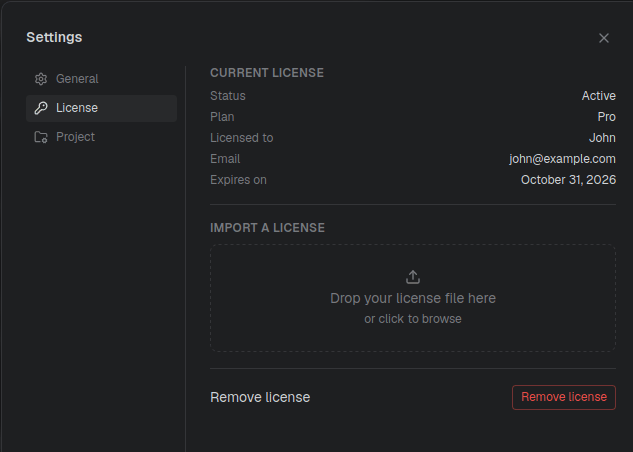
The panel switches to the license's details as soon as the signature checks out: status, plan, who it is licensed to, and the expiry date. Nothing to restart: the daemon picks the file up the moment it is written.
From the CLI
Same result, useful on a headless machine or in a dotfiles script:
craftr license install --file=license.key
Or pipe it in:
cat license.key | craftr license install
Both work outside a project directory. On success the command prints the resulting license state as JSON; on failure it says why and leaves whatever license was already installed untouched.
By hand
The app and the CLI both just write the file to:
~/.config/api-craft/license.key
(or $XDG_CONFIG_HOME/api-craft/license.key if you set XDG_CONFIG_HOME). Copying the file
there yourself is equivalent.
Check its status
craftr license get prints the active state:
{
  "status": "active",
  "tier": "pro",
  "issuedTo": { "name": "Ada Lovelace", "email": "[email protected]" },
  "issuedAt": "2026-09-10T00:00:00.000Z",
  "expiresAt": "2027-09-10T00:00:00.000Z",
  "daysUntilExpiry": 365,
  "limits": { "maxApis": -1, "maxEnvironments": -1, "maxWorkflows": -1, "maxHistoryPerApi": 100 }
}
-1 in a limit means unlimited. In the app, the header shows a Pro badge next to the
name on the license.
When it expires
A license is valid for one year from issue. It does not renew on its own: there is no subscription and nothing is charged again. The app walks you through the end of the term:
| Status | When | What you see |
|---|---|---|
active | More than 30 days left | Nothing. |
expiring | Last 30 days | A banner with the expiry date and a Renew button pointing at the pricing page. Pro limits still apply. |
grace | Up to 14 days past expiry | A banner asking you to renew before the grace period ends. Pro limits still apply, nothing locks. |
expired | Past the grace period | A permanent banner. The app runs on Free limits. |
Every banner also offers Import a license, which opens the Settings tab, and I haven't received it, which opens a mail to support.
Renewing means buying another year and installing the new file over the old one.
What Free mode means
When a license expires, or when you have none, Free limits apply, but nothing on disk changes. Your files are plain JSON in your repository and stay exactly as they were.
The limits are counted against what already exists. If a project has more of something than Free allows, the app locks its use of the extras rather than deleting anything: sorted by name, everything past the limit can no longer be edited or run. The app shows a panel explaining why, the CLI refuses with an error. Delete an item to free the next one, or install a license and everything opens again.
The lock is in the app, not on the files. A locked API is still in your repository, still committed, still readable by anything else. API Craft just declines to work on it until you are back under the limit.
Remove a license
Settings → License → Remove license, or:
craftr license remove
The app returns to the Free plan immediately. Your projects are not touched, and the same file can be installed again at any time.
If something goes wrong
| Message | Cause | What to do |
|---|---|---|
| This file is not a valid license. | Wrong file, or the text was altered; a stray line break from a mail client is enough. | Save the attachment again without opening it in an editor. |
| This license signature is invalid. | The content no longer matches its signature. | Same as above. If it persists, ask support for a reissue. |
| This license was signed with an unknown key. | Your app is older than the key that signed the license. | Update API Craft. |
| This license was issued for a newer version of API Craft. | Same, at the file-format level. | Update API Craft. |
| This license has already expired. | The file you are installing is past its grace period. | Nothing is overwritten. Buy a new one, or install the current file instead. |
Nothing an hour after purchase? Check spam, then write to [email protected] with the order number from your Paddle receipt.