why
The difference isn't a feature. It's the model.
| Postman | Bruno | API Craft | |
|---|---|---|---|
| Where your work lives | Their servers | Your repo | Your repo |
| Account | Required to keep anything | None | None |
| Format | Proprietary; export to leave | .bru files | JSON, YAML, Markdown, OpenAPI |
| What's modeled | A folder of requests | A folder of requests | Resources and operations, from the spec |
| The OpenAPI spec | Imported once | Imported once | The source of truth |
| A request is | One mutable object | One file | N instances per operation |
| Working with someone | Per seat, per month | git | git |
Bruno got the file layer right, and got it right first. API Craft goes one layer up.
instances
A request is a file, not a slot you overwrite.
Everywhere else a request is a single mutable object, so to try something you overwrite the thing you're trying it on. Here an operation comes from the spec and each request instance is a file under it. Keep as many as you want: shared with the team, personal, or scratch.
# the usual model
Get pet          ← one request, edited in place,
                   saved over or thrown away

# API Craft
pets/get         ← operation, from the spec
├── get-prod-pet.json          shared
├── .local.debug-500.json      yours
└── .temp.get.json             scratch
find-by-status.json
public
Committed. Shared with the team, reviewed in PRs.
.local.debug-slow-query.json
private
Gitignored. Personal and durable. Your debugging setup never pollutes the repo.
.temp.get.json
temp
The scratch pad, one per operation. Every edit is persisted here, debounced and crash-safe.
The temp instance replaces "unsaved changes". There is no save button and no save dialog because there is nothing unsaved: every edit is already on disk. When a scratch request is worth keeping, promote it to a named public or private instance.
files-first
A request change is a diff in a PR, like any other code.
apis/petstore-api/resources/Pet/requests/find-by-status.json
   "params": {
     "query": {
-      "status": "available"
+      "status": "sold",
+      "limit": "25"
     }
}- Review. See exactly which header changed on which request, in a PR.
- CI.
craftr workflow runin a GitHub Action. Same files, no export step. - Bulk edit.
sed,jqandfindwork on your API config. - Onboarding.
git cloneand a new dev has the whole setup, minus secrets. - No lock-in. JSON, YAML, Markdown, OpenAPI. Delete the app; keep everything.
The GUI holds no hidden state: it reads and writes the same files you do. Edit a file in vim and the app reflects it live. The app is just another editor of your repo.
model
We model an API, not a list of HTTP bookmarks.
Petstore                ← API, spec is the source of truth
└── pets                ← resource
    ├── findByStatus    ← operation, from the OpenAPI spec
    │   ├── find-available-pets      ← instance (shared)
    │   └── .local.debug-slow-query  ← instance (yours)
    ├── get
    └── create
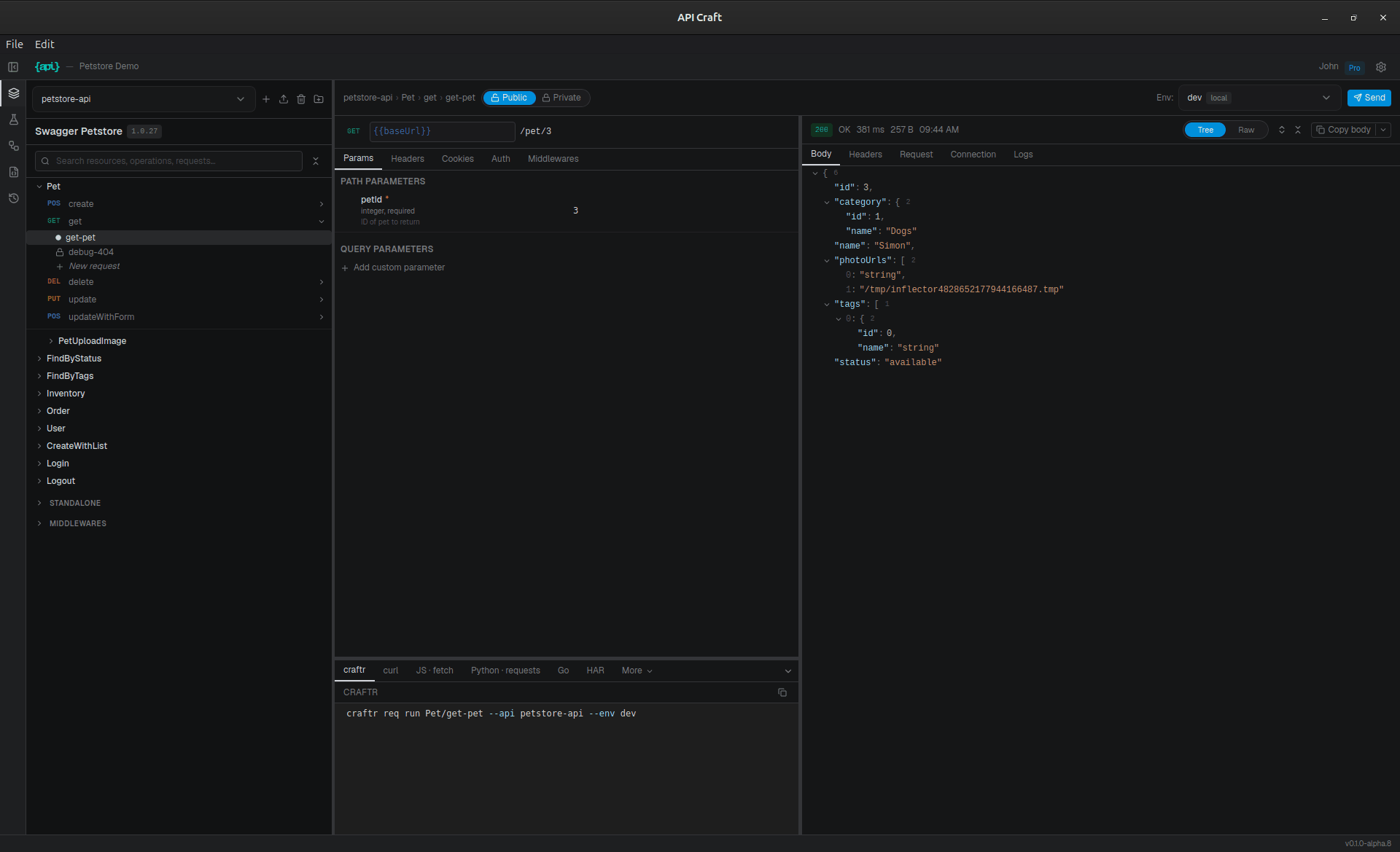
Import an OpenAPI spec (file or URL, JSON or YAML) and API Craft maps routes into resources and operations: heuristics first, your rules on top. APIs without a spec work too: define resources and operations locally.
Re-import a new spec version and get a diff report: added routes auto-mapped, removed ones flagged, conflicts between your overrides and upstream changes resolved field by field. Your edits survive the re-import.
environments
Environments inherit. Secrets never leave your machine.
environments/
├── schema.json            ← variables declared & typed
├── production.json        ← baseUrl, committed
├── prod-eu.json           ← extends production
├── prod-eu-client-a.json  ← extends prod-eu
└── prod-eu-client-a.secrets.env   ← gitignored
Variables are declared once in a schema: typed, required or optional, secret or not. Values live in committed JSON per environment; secrets live next to them in gitignored dotenv files. The extends chain resolves recursively, with cycle detection.
Twenty environments across three stages and five clients stays manageable: each file only holds what it overrides.
workflows
API tests as state machines. In JSON, in your repo.
A workflow is a sequence of typed blocks: request, assert, transform, condition, loop, group, script. Declarative assertions for the common cases, TypeScript functions when you need real logic.
Workflows are project-scoped: each request block names the API it targets, so a single run can create through one API and verify through another, binding an environment per API as it goes.
Turn on contract validation and every response in the run is checked against the OpenAPI spec (status codes, body schema, required headers) without writing a single assertion.
Author and run them in the GUI; run the same files headless with craftr workflow run in CI.
loop    create-pets          ×5, parallel
  request create-pet-{{i}}
  assert  created-{{i}}
request list-pets
transform extract-ids
condition any-pending?
  request process-pending
assert  all-available
so what
What that actually buys you
Start from the file and everything else follows.
The spec is a file, so it stays the source of truth instead of being imported once and forgotten. Operations come from the spec, so a request is attached to something real rather than floating in a folder. A request instance is a file too, which is why one operation holds as many as you need: the one the team shares, the one where you reproduce a 500, the scratch pad you never name.
Environments are files, so they inherit from each other and secrets sit gitignored next to them. Workflows are files, so CI runs exactly what you authored. The GUI holds no hidden state: it reads and writes what you'd edit in vim, and the CLI is the same tool without a window.
Nothing is synced, exported or rebuilt, because there is no copy of your API anywhere but your repo. There is nothing to leave.
An IDE for the API, not a client for HTTP.
Bruno, honestly
Bruno got the hard part right, and got it right first: requests are text files in your repo, open source, no cloud. Credit where it's due: if files-first requests are what you need, use Bruno.
API Craft goes one layer up. A Bruno collection is a flat list of requests in a .bru format, and OpenAPI is something you import once. Here the spec stays the source of truth, routes are modeled as resources with operations, and every operation holds as many instances as you want.
Bruno fixed the file layer. API Craft is an IDE for the API.
agents
Your agent already knows how to use it.
Every project is JSON, YAML and Markdown on disk. Claude Code, Cursor, or any coding agent can read your API model, write a request instance, or add a workflow, with the file tools they already have. No plugin, no integration, no API key.
The CLI closes the loop. It prints JSON on stdout and takes commands for everything the app can do, so an agent can inspect the effective spec, run what it just wrote, read the result, and fix itself, instead of guessing whether it got it right.
There is no chatbot in API Craft, and there won't be. No sparkle button, no assistant panel, no network call to a model we picked for you. The app stays a tool. Bring your own agent, or none at all.
> add a request for sold pets and check it works

  Bash   craftr schema read -a petstore-api
         → Pet: get, create, delete, update…
  Write  apis/petstore-api/resources/Pet/
           requests/find-sold.json
  Bash   craftr req run Pet/find-sold
           --env dev
         → {"status": 200, "body": [ … ]}

Added find-sold. Returns 200 with 4 pets.
It asks the CLI what the API looks like rather than parsing the spec by hand, overrides and mapping rules included.
roadmap
What's here, what's coming.
0.1 ships the core: spec import & re-import, resources and operations, request instances, environments, workflows, middlewares, the full CLI. The rest is planned, and labeled as such everywhere on this site.
Export pipelines coming
Static docs site, AWS API Gateway spec, cleaned specs for SDK generators.
Snapshot sessions coming
Record a baseline, replay against another env or version, diff the responses.
Plugins coming
npm packages with hooks on the spec and requests, custom CLI commands, UI extensions.
IDE plugins coming
VS Code and JetBrains: run requests and workflows from the editor.
Web companion coming
Shared secrets, scheduled runs, dashboards. Optional: local stays complete without it.
Windows coming
Desktop build for Windows. The CLI already runs under WSL2.
faq
Questions with straight answers.
Is it open source?
The core is not open source today. The script SDK (@apicrafthq/script-sdk) is public on npm, and support runs through a public GitHub repo. The open/closed split is deliberate: your data is in open formats (JSON, YAML, Markdown, OpenAPI) on your disk, so the lock-in question is answered by the file format, not the license.
Windows?
Coming. Today it ships Linux (deb, rpm or AppImage) and macOS (dmg). The CLI runs on Linux and macOS today; on Windows use WSL2.
How is the license delivered?
By email, within minutes of purchase. It is a signed file you drop into Settings → License, verified locally with an embedded public key. No activation server, no phone-home. The docs have a guide.
Who builds this?
One person. This is a pre-1.0 product: the core works and is tested daily on real APIs, but expect rough edges. Bug reports get answered fast, and Pro buyers get priority. That trade is explicit.