Request instances
A request instance is a saved, runnable call against an operation. You create and edit instances in the app; you run them from either the app or the CLI.
Creating
In the app, open an operation in the schema sidebar. Your edits autosave to a
temp request as you go. Press Ctrl+S to save it as
a real instance: public (committed) or private (.local., gitignored).
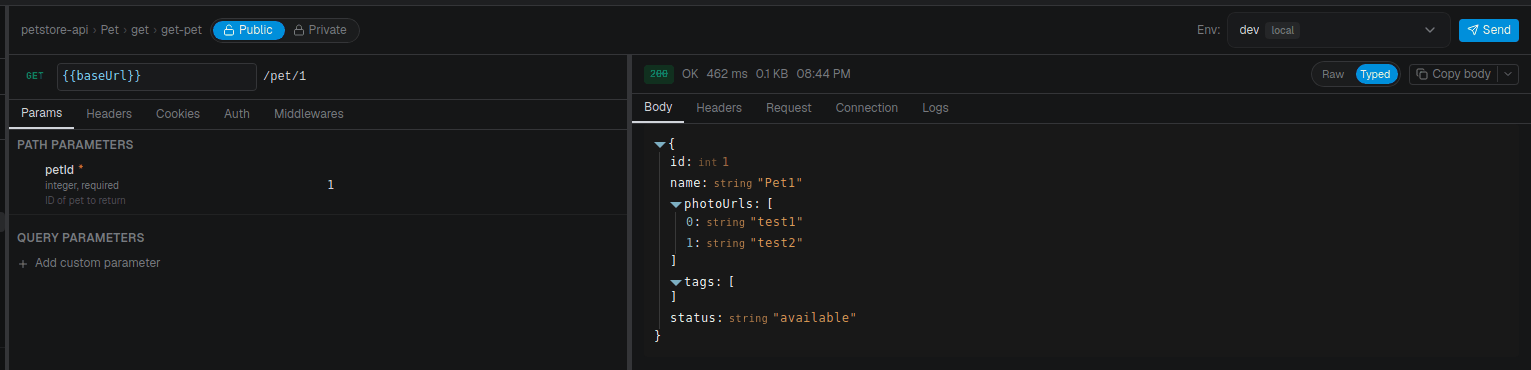
From the CLI you can copy and rename existing instances, but not create one from scratch (authoring lives in the app):
craftr req duplicate Pet/get-pet get-pet-staging
craftr req rename Pet/get-pet-staging get-pet-stg
craftr req set-visibility Pet/get-pet-stg private
craftr req list -r Pet
Defaults are a starting point
When a request is created, API Craft copies the defaults that apply to it into the new file: merged API → resource → operation, each level overriding the one above:
| Default | Set on |
|---|---|
| Auth | API, resource |
| Headers, cookies | API, resource |
| Body | Operation |
| Middlewares | API, resource, operation |
They are seeded, not inherited. Once the instance exists it owns its values outright, and changing a default later does not touch requests that already exist: no silent rewrite of a file you committed, and no request quietly changing behaviour because someone edited the API.
The flip side: after changing a default you must decide what to do with existing instances.
- A saved instance (public or private) is yours to edit: change the field, or delete and recreate it to pick the new defaults up.
- The temp request has a shortcut: Reset to template in its top bar discards your current edits and rebuilds it from the operation's defaults as they are now. It's the fast way to see what a new request would look like after a defaults change, and, day to day, the way to throw away a messy scratch request and start over.
Reset to template only appears on a temp request, since it discards edits. Saved instances never rewrite themselves.
Running
craftr req run Pet/get-pet -e dev
A request is addressed as resource/name, or bare name for a standalone
request, which has no resource. -e is the environment. The
response body prints to stdout, so it pipes into jq:
craftr req run Pet/get-pet -e dev | jq '.name'
To try another filter without sending the request again, add --from-history: it reuses the
last response for that request and environment (details).
Add --full to print the whole execution result (request + response + status) instead of
just the body.
Overriding at run time
Two distinct override mechanisms:
--setchanges a request parameter, by location:path,query,header,cookie, orbody. Body keys support dot-notation for nested fields. Themiddlewarelocation overrides a middleware option instead; see overriding middlewares from the CLI, together with--enable-middleware/--disable-middleware.--varoverrides an environment variable (it must be declared in the schema).
craftr req run Pet/create-pet -e dev \
  --set body.name=Rufus \
  --set body.status=available \
  --set body.category.name=Dogs \
  --set header.X-Debug=true

craftr req run Pet/create-pet -e dev --var timeout=1000
--var acts on the variable layer (before {{placeholders}} resolve); --set acts on the
built request afterward. See environments
for resolution order.
Standalone requests
A request that doesn't map to a spec operation defines its call inline and runs without a resource:
craftr req run quick-inventory-check -e dev
See the request instance format for the full file shape.