Environments
Anything that changes between dev, staging, and prod (base URLs, keys, timeouts) lives in
an environment, not in your requests. Requests reference variables with
{{placeholders}}; environments supply the values at run time.
Declare, then fill
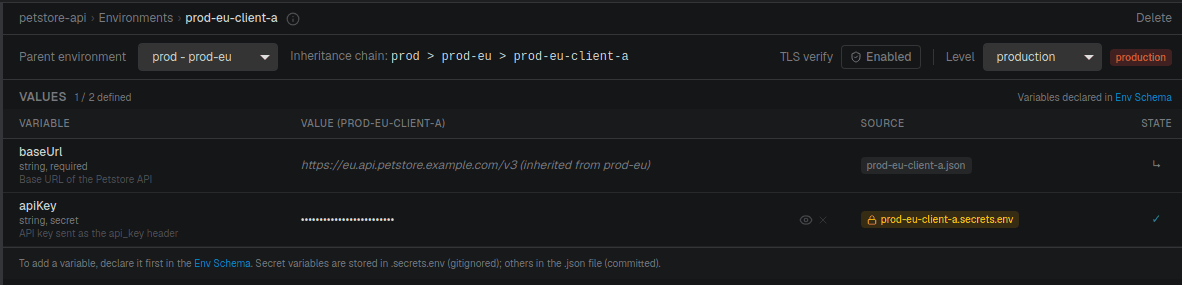
Variables are declared once in the environment schema, then given values per environment. Declaration comes first: a variable must exist in the schema before it can hold a value.
// apis/petstore-api/environments/schema.json
{
  "version": 1,
  "variables": {
    "baseUrl": { "description": "Base URL of the API", "type": "string", "required": true },
    "apiKey":  { "description": "API key", "type": "string", "required": true, "secret": true },
    "timeout": { "description": "Request timeout (ms)", "type": "number", "default": 5000 }
  }
}
The schema gives each variable a type, whether it's required, an optional default, and whether it's a secret.
You declare variables in the app's environment schema editor (there's no CLI for editing the
schema). Once declared, set values with craftr env write or in the app. Importing a spec
declares the first ones for you: baseUrl, one variable per server URL placeholder, and a
secret per security scheme, along with an environment per servers entry. See
what the first import sets up.
Values and secrets
Non-secret values are committed; secrets are not. When you set a variable that the schema
marks secret: true, API Craft routes it to a gitignored *.secrets.env file
automatically; you don't manage two files by hand.
// apis/petstore-api/environments/dev.json   (committed)
{ "baseUrl": "https://petstore3.swagger.io/api/v3", "timeout": 10000 }
# apis/petstore-api/environments/dev.secrets.env   (gitignored)
apiKey=sk-dev-abc123xyz
Environments are discovered automatically from the *.json files in environments/ (except
schema.json); there's no list to maintain.
Inheritance
An environment can extend another. Inheritance is recursive: each level overrides the one
it extends, and secrets follow the same chain.
// prod.json
{ "baseUrl": "https://api.example.com" }
// prod-eu.json
{ "extends": "prod", "baseUrl": "https://api-eu.example.com" }
// prod-eu-client-a.json
{ "extends": "prod-eu" }
Resolving prod-eu-client-a walks prod → prod-eu → prod-eu-client-a, with each level
overriding the previous. Cycles (a extends b extends a) are detected and rejected with
a clear error.
extends, level, and tls are reserved keys; they're managed as inheritance,
environment level, and TLS options, not as ordinary variables. The level (production,
staging, or local; default local) is what triggers the app's confirmation prompt
before you fire a request at a production environment.
TLS verification
By default, requests verify the server's TLS certificate. For an environment that points at a host with a self-signed or otherwise untrusted certificate (a local dev box, an internal staging server), you can turn verification off per environment:
// staging.json
{ "tls": { "verify": false } }
Verification is on unless verify is explicitly false. Like other reserved keys, tls is
inherited along the extends chain (a child environment overrides its parent) and it's set
from the app's environment panel, not the CLI. A run made with verification off records that
fact in its result, so it's visible in history.
Disabling verification skips certificate checks for that environment's requests. Use it for trusted internal hosts, not for production traffic.
How a placeholder is resolved
When a {{variable}} is resolved for a run, layers are merged in this order, later wins:
- Schema defaults: the
defaultdeclared in the schema. - Environment values and secrets: the merged
extendschain; within an environment, secrets override plain values, and a child overrides its parent. - System environment /
--var: a process variable namedAPI_CRAFT_VAR_<NAME>(uppercased). The CLI's--var name=valuesets exactly this.
So --var and system environment variables win, then committed/secret values, then
defaults. Only variables declared in the schema are read from the system environment,
and any required variable that resolves to nothing fails the run with an explicit error.
# override a variable for a single run
craftr req run Pet/get-pet -e dev --var timeout=1000
Inside a workflow
Workflows add a layer of their own in front of the ones
above. A {{token}} in a workflow is first matched against the run's own data: workflow
inputs, earlier block results, transform outputs, and the current loop iterator.
Whatever doesn't match is left alone and falls through to the environment layers above.
{ "body": { "name": "{{petName}}", "host": "{{baseUrl}}" } }
petName is a workflow input, so the workflow resolves it. baseUrl isn't, so it reaches the
environment resolver, which uses the environment bound to that block's API, since a workflow
can span several APIs and binds an environment per API at run time.
Only the environment layer is per-API. Inputs, block results, and transform outputs are global to the run, so a value produced against one API can feed a request to another.